Account & API access
Your Account settings live under Settings → Account in the Spanline app. They cover how you sign in (password, MFA, sessions) and how runners authenticate (personal API tokens for the CLI and CI).
Organization policy (SSO, password rules, MFA requirements) is enforced before workspace work begins — but day-to-day token and session management starts here.
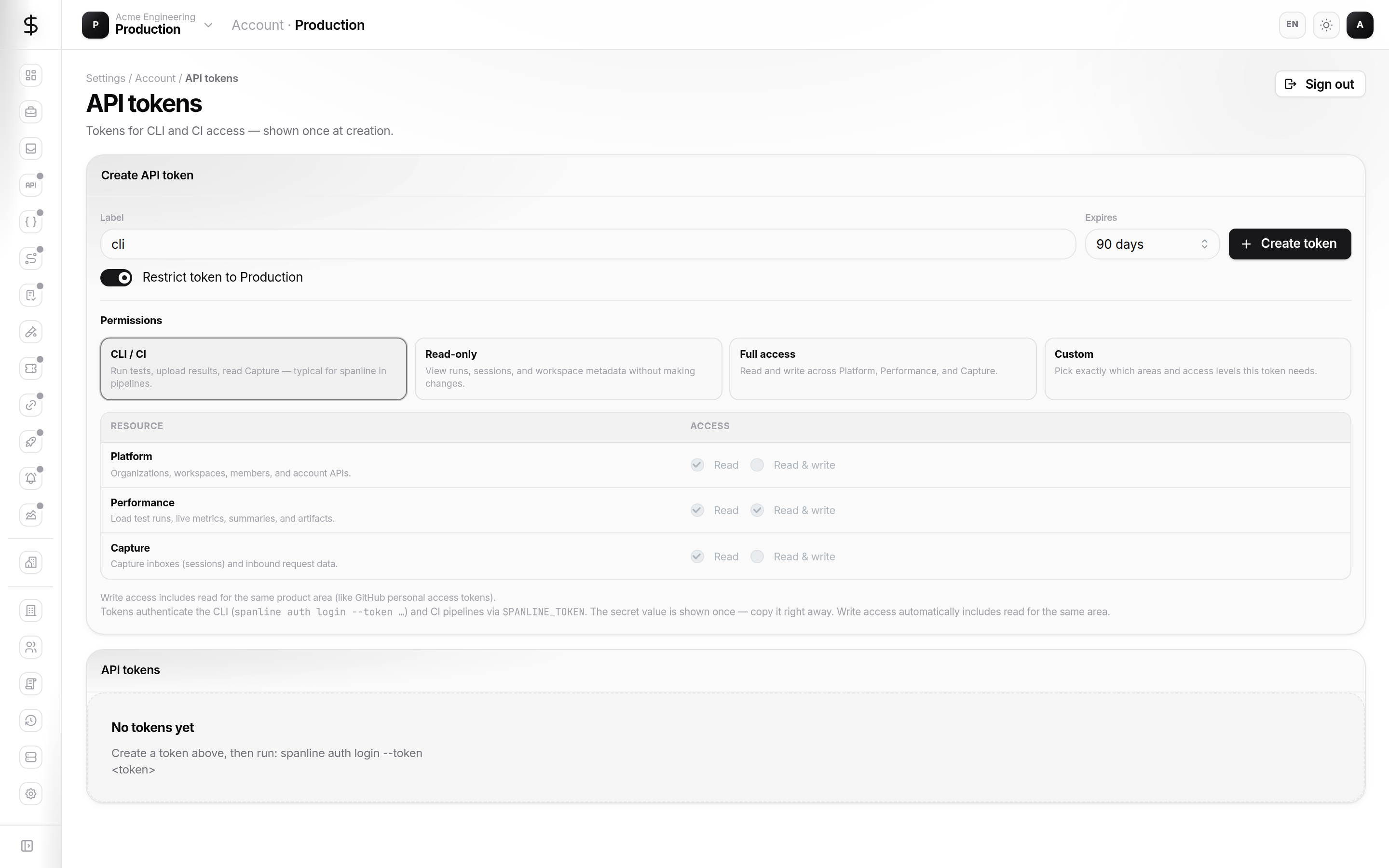
How it fits together
| You manage… | In the app… | Used by… |
|---|---|---|
| Sign-in & MFA | Account → Security | Browser sessions |
| Active browsers | Account → Sessions | Revoke lost devices |
| API tokens | Account → API tokens | spanline CLI, CI jobs, scripts |
| Locale & theme | Account → Preferences | Personal UI only |
API tokens are personal — they belong to your user, not to a shared service account (org device keys are a separate, upcoming surface).
Tour the surfaces
| Surface | URL | What you use it for |
|---|---|---|
| Profile | /account |
Identity in the current org and workspace |
| Security | /account/security |
Password, authenticator enrollment |
| Sessions | /account/sessions |
List and revoke browser sessions |
| API tokens | /account/tokens |
Mint scoped tokens; copy once at creation |
| Preferences | /account/preferences |
Appearance, locale, notifications |
New here?
Follow Getting started — sign in, mint a CLI token with the right permissions, and run spanline auth login.
Quick start (CLI token)
- Sign in at app.spanline.dev.
- Open Settings → Account → API tokens.
- Choose the CLI / CI preset (or Custom for least privilege).
- Click Create token and copy the value immediately — it is shown once.
- On your laptop or CI runner:
spanline auth login --token sl_…
spanline auth workspace list
spanline auth workspace use <workspace-name-or-id>
Performance runs, Capture reads, and other API calls use the scopes you selected. See Concepts → Token scopes.
What you can do today
| Task | Where |
|---|---|
| Mint a scoped API token | API tokens — presets + permission matrix |
| Restrict a token to one workspace | Restrict token to … toggle on create |
| Revoke a lost token | API tokens list → Revoke |
| Sign out other browsers | Sessions → revoke |
| Enroll MFA when org requires it | Security — guided enrollment |
In this guide
| Page | Contents |
|---|---|
| Getting started | First token + CLI login end to end |
| Concepts | Sessions vs tokens, scopes, workspace pin |
| Guides | Tokens, sessions, security step by step |
| Access & safety | Least privilege, rotation, screenshot hygiene |
| FAQ | Common errors and empty states |